Most AI fitness apps give you generic programs with surface-level customisation. ChatGPT and Claude can generate programs tailored to your exact goals, equipment, and schedule. You need the right format — and a way to validate it works.
The problem with generic AI fitness apps
Fitbod adjusts your workout based on muscle recovery. Aaptiv generates plans from a few inputs. Mad Muscles promises personalisation through algorithms.
All use proprietary systems. All limit customisation to surface inputs: experience level, goal, available equipment. None let you specify training philosophy, injury history, schedule constraints, or exercise preferences beyond broad categories.
You pay monthly for programs you could generate yourself.
LLMs can generate custom programs
ChatGPT, Claude, and other large language models understand training principles. Progressive overload. Periodisation. Volume landmarks. Recovery management.
Ask for a 4-day upper/lower strength program with barbell emphasis and bodyweight accessory work. Specify rest periods based on training goals. Request warm-up sets for main lifts, failure sets for isolation work. Include coaching cues for technique.
The LLM generates a complete program.
The problem: LLMs output unstructured text by default. Training apps need structured data — JSON format with specific fields, valid exercise types, proper muscle group hierarchies.
That's where Intrvl's llms.txt documentation comes in.
What llms.txt does
The llms.txt standard tells LLMs how to structure output for specific applications. Anthropic, Cursor, and other developer tools adopted it for documentation. Intrvl uses it for program generation.
Visit intrvl.app/llms.txt and you'll find complete Program Schema v1.6 documentation. Field definitions. Valid exercise types. Muscle group hierarchies. Three complete example programs (5x5 strength, Push/Pull/Legs hypertrophy, bodyweight core work).
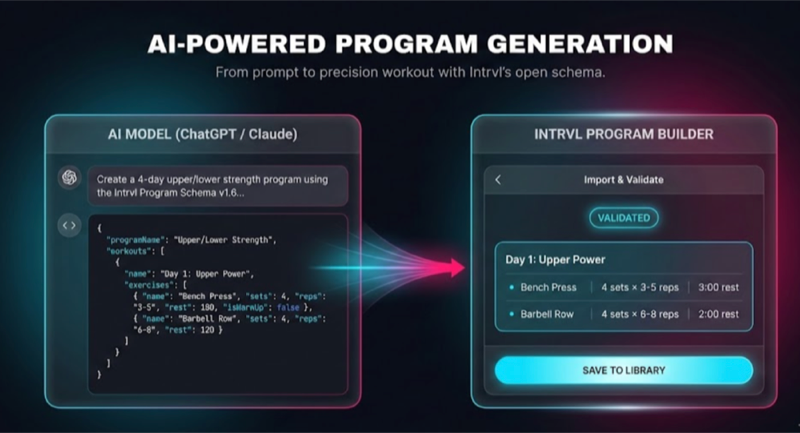
When you reference this documentation in your ChatGPT or Claude prompt, the LLM generates valid JSON that imports directly to Intrvl. No manual formatting. No schema errors. No guessing at field names.
Step-by-step: generate your first program
Step 1: Access the schema
Open intrvl.app/llms.txt in your browser. This gives you the documentation URL to reference in prompts.
Step 2: Write your prompt
Be specific. The more detail you provide, the better the output.
Example prompt:
"Create a 4-day upper/lower strength program using the Intrvl Program Schema v1.6 at https://intrvl.app/llms.txt. Include warm-up sets for main lifts (squat, bench press, deadlift, overhead press). Target 3-5 reps for strength work with 3-minute rest periods, and 8-12 reps for hypertrophy accessories with 90-second rest. Use barbell for main lifts, dumbbells for accessories. Tag all warm-up sets with isWarmUp: true. Include coaching notes for proper technique on compound movements."
Step 3: Download the file
ChatGPT or Claude outputs a complete file in JSON format. Download it to your computer. The LLM typically provides a download link or button for the generated file. Save it with a recognisable name like "upper-lower-strength.json".
The file includes program metadata (name, author, description), workout definitions (name, rest defaults), exercise specifications (capabilities, muscle groups, equipment), and set prescriptions (reps, weights, rest periods, warm-up tags).
Step 4: Validate in Program Builder
Open intrvl.app/program-builder. No account required.
Click the Import button. Your system's file picker opens. Find the JSON file you downloaded in Step 3 and open it.
Program Builder validates against Schema v1.6 instantly. If there are errors (invalid exercise type, muscle group conflicts, missing required fields), it tells you exactly what's wrong.
When validation passes, you see a visual preview: workouts listed, exercises organised, sets displayed with all prescriptions. Check that muscle group distribution matches your intent. Verify rest periods align with your goals.
Step 5: Export and import
Program Builder's export button generates a ready-to-import file. Save it and copy it to iCloud either via the web or send it to your iPhone's files.
On your iPhone, open the file or tap a link to it. iOS prompts "Open in Intrvl." The program imports. Schedule workouts to specific dates or start immediately.
Your custom AI-generated program is now executable with precision timing and complete tracking.
What you can generate
Training splits: Push/Pull/Legs, Upper/Lower, Full Body, Bro Split, 5-day bodybuilding, 3-day powerlifting.
Sport-specific programs: Powerlifting peaking cycles, bodybuilding volume blocks, hybrid strength-conditioning, sport conditioning (rugby, basketball, combat sports).
Equipment-constrained programs: Home gym with barbell and bench. Hotel gym with dumbbells only. Minimal equipment bodyweight programs. Resistance band work.
Periodisation schemes: Linear progression, undulating periodisation, block periodisation, auto-regulation with RPE.
Goal-specific programs: Strength development (1-5 reps, long rest), hypertrophy focus (6-12 reps, moderate rest), conditioning (HIIT, EMOM, Tabata), or hybrid approaches.
The LLM understands training principles. It builds programs around those principles. You control the inputs.
Why this matters
You're not paying $10-20/month for a fitness app's proprietary algorithm. You're using tools you already have (or tools available for free).
Full customisation. Specify injury accommodations, exercise preferences, schedule constraints, training philosophy. The program reflects your needs, not an algorithm's assumptions.
No platform lock-in. JSON is an open format. If another app supports Program Schema v1.6, your program works there too. If you want to edit manually, JSON is human-readable.
Privacy-first. Your interaction with the LLM is between you and the AI. No middleman platform tracking your training data. Intrvl processes everything on-device. Optional iCloud sync is Apple-managed. The company never sees your information.
When to use this vs. generic AI apps
Use LLM-generated programs when you want control. When you understand training principles and want a program that reflects your specific context.
Use generic AI apps (Fitbod, Aaptiv) when you want hands-off programming. When you don't want to think about program design.
Intrvl doesn't tell you what to do. It gives you tools to execute what you already know — or what you've designed with an LLM that understands training science.
No workout videos. No AI coach. Just data that respects your intelligence.
When a coach is worth it
LLMs generate solid programs based on training principles. But they can't observe your form, adjust for your specific biomechanics, or adapt programming based on your recovery patterns and life stress.
If you can afford a coach, the combination of human expertise and precision tracking is powerful. A coach who understands your movement quality, injury history, and response to training can write better programs than any algorithm.
Intrvl supports this. Coaches can generate programs using the same JSON format — either manually or with LLM assistance — and distribute them to clients via simple file sharing. No servers. No accounts. No platform fees. Just email, cloud storage, or messaging.
The athlete imports the program, executes it with precision timing, and tracks every rep. The coach reviews data and adjusts the next training block based on actual performance, not guesswork.
LLM-generated programs are for lifters who know how to train and want control. Coach-written programs are for those who want expert guidance alongside precision tools. Both work in Intrvl.
Try it now
Generate your first program with ChatGPT or Claude. Reference intrvl.app/llms.txt in your prompt. Validate the output in Program Builder (no account required). Export and import to Intrvl.
Try Intrvl free for 7 days. $39.99/year or $79.99 lifetime. No ads. All analytics included.
Time every interval. Track every lift. Know what works.